


Smithsonian by Celestron NexStar 6SE Computerized Telescope
Smithsonian by Celestron NexStar 6SE Computerized Telescope
Item #: 22213
Out of stock









Couldn't load pickup availability
Free Ground Shipping! Contiguous USA only
30-Day Returns
2-Year Warranty
- SMITHSONIAN BY CELESTRON: Explore the night sky with a special-edition NexStar 6SE created in collaboration with the Smithsonian, pairing Celestron’s proven computerized telescope technology with Smithsonian-inspired design and educational resources that encourage continued exploration.
- 6” SCHMIDT-CASSEGRAIN OPTICS: The 150mm aperture and 1500mm focal length deliver detailed views of the Moon and planets while gathering enough light to explore brighter deep-sky objects, including star clusters, nebulae, and galaxies.
- COMPUTERIZED GOTO MOUNT: After alignment, select a target from the NexStar+ hand control. The motorized mount automatically finds it and tracks the object as it moves across the sky. The database includes more than 40,000 celestial objects.
- EASY SKYALIGN TECHNOLOGY: You don’t need to know the names of stars to get started. Enter your date, time, and location, then center any three bright celestial objects. SkyAlign determines exactly where the telescope is pointing, so you’re ready to locate and track objects.
- STARBRIGHT XLT OPTICAL COATINGS: Celestron’s StarBright XLT coatings enhance light transmission through the optical system for brighter, higher-contrast views.
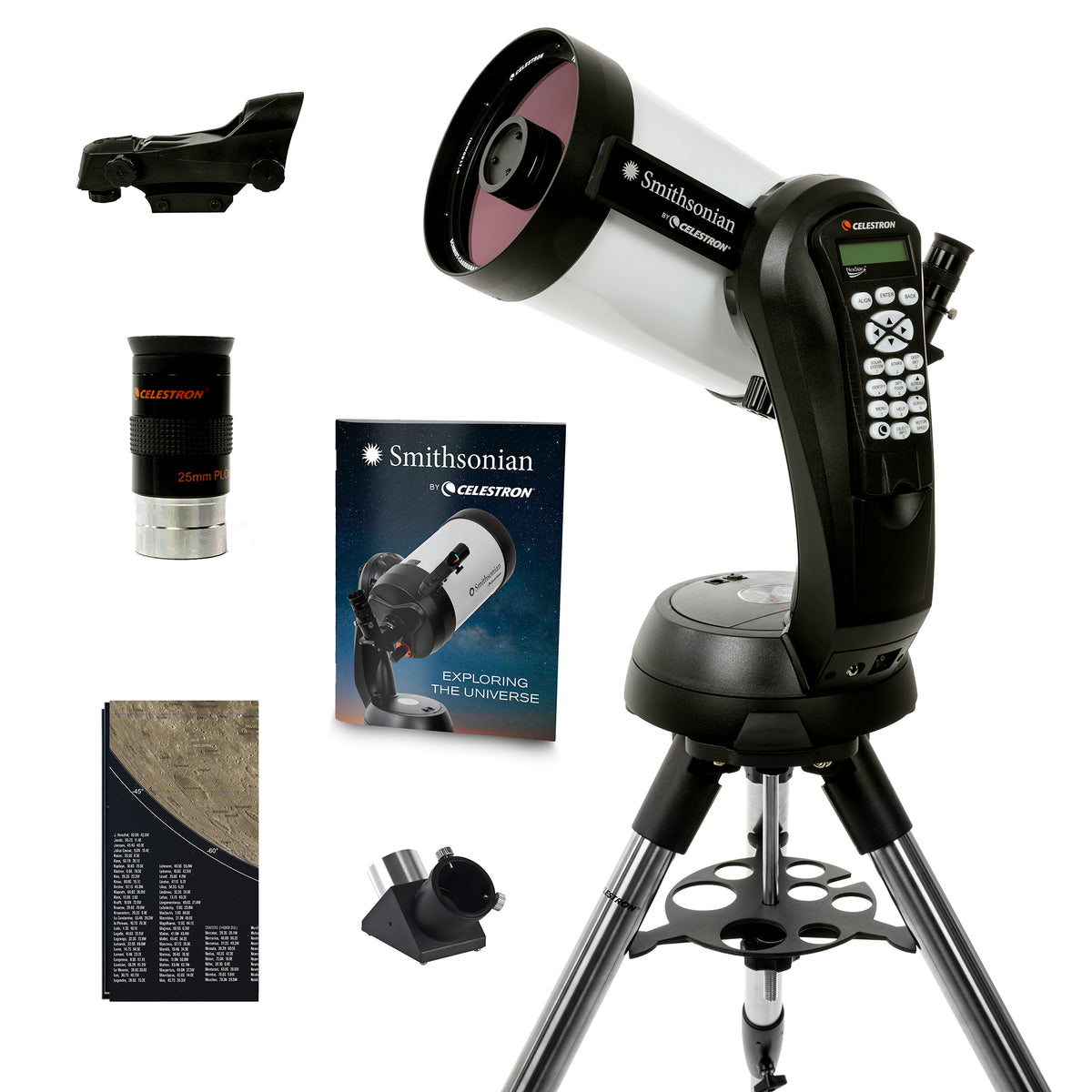
- COMPLETE OBSERVING SETUP: Includes a sturdy adjustable steel tripod with accessory tray, 25mm 1.25” eyepiece providing 60x magnification, 1.25” star diagonal for comfortable viewing, StarPointer red dot finderscope, and NexStar+ computerized hand control.
- EXPAND YOUR EXPERIENCE: The included Starry Night Special Edition astronomy software helps you learn the sky and plan observing sessions, while the SkyPortal Powered by SkySafari™ mobile app can enhance your experience in the field.
- FLEXIBLE POWER & COMPUTER CONTROL: Power the telescope with eight AA batteries (not included), an optional 12V AC adapter, or a Celestron PowerTank. Connect the NexStar+ hand control to a computer via USB for firmware updates or to control the telescope via PC.
Specifications
Specifications
| Optical Tube Info: | |
|---|---|
| Optical Design: | Schmidt-Cassegrain |
| Aperture: | 150mm (5.91") |
| Focal Length: | 1500mm (59") |
| Focal Ratio: | f/10 |
| Focal Length of Eyepiece 1: | 25mm (.98") |
| Magnification of Eyepiece 1: | 60x |
| Finderscope: | StarPointer™ red dot finderscope |
| Star Diagonal: | 1.25" Star Diagonal |
| Optical Tube: | Aluminum |
| Highest Useful Magnification: | 354x |
| Lowest Useful Magnification: | 21x |
| Limiting Stellar Magnitude: | 13.4 |
| Resolution (Rayleigh): | 0.93 arc seconds |
| Resolution (Dawes): | 0.77 arc seconds |
| Light Gathering Power (Compared to human eye): | 459x |
| Secondary Mirror Obstruction: | 56mm (2.2") |
| Secondary Mirror Obstruction by Diameter: | 37% |
| Secondary Mirror Obstruction by Area: | 14% |
| Optical Coatings: | StarBright XLT |
| Optical Tube Length: | 406mm (16") |
| Optical Tube Diameter: | 181mm (7.1") |
| Optical Tube Weight: | 8 lbs (3.6 kg) |
| Mount Info: | |
| Mount Type: | Computerized Altitude-Azimuth Single Fork Arm |
| Instrument load capacity: | 12 lbs (5.44 kg) |
| Height adjustment range (includes mount and tripod): | 965.2mm - 1422.4mm (38" - 56") |
| Tripod leg diameter: | 38.1mm (1.5") Stainless Steel |
| Mount Head Weight: | 11 lbs (5 kg) |
| Accessory Tray: | Yes |
| Tripod Weight: | 9 lbs (4.08 kg) |
| Slew Speeds: | 9 slew speeds - max speed 5°/second |
| Tracking Rates: | Sidereal, Solar and Lunar |
| Tracking Modes: | Alt-Az, EQ North and EQ South |
| GPS: | N/A |
| Dovetail Compatibility: | CG-5 dovetail |
| Number of Auxiliary Ports: | 1x AUX Port |
| Autoguide Port: | Yes |
| USB Port: | Yes, Hand Control input |
| Power Requirements: | 8-AA batteries (not included) and 12 VDC-750 mA (Tip positive) |
| Motor Drive: | DC servo motors |
| Alignment Procedures: | SkyAlign, 1-Star Align, 2-Star Align, Auto 2-Star Align, Solar System Align, EQ North / EQ South Alignment (EQ align requires an equatorial wedge) |
| Periodic Error Correction: | No |
| Computerized Hand Control: | Double line, 18 character Liquid Crystal Display with 19 fiber optic backlit LED buttons |
| NexStar+ Database: | 40,000 objects, 200 user defined programmable objects. Enhanced information on over 200 objects |
| Software: | Celestron Starry Night Special Edition Software and SkyPortal App |
| Total Kit Weight: | 28 lbs (12.7 kg) |
| Included Items: | Optical tube Single Fork Arm Mount and Tripod Accessory Tray Star Pointer Finderscope NexStar+ Hand Control 25mm eyepiece Star Diagonal |
| Additional Information | |
| Solar Warning |
|
| California Prop 65 |

WARNING: Cancer and Reproductive Harm - www.P65Warnings.ca.gov |


Included Celestron Technologies


Compatible Technologies


-
SkyPortal WiFi Module
Regular price $143.95Regular price -
Dew Heater Ring - 6"
Regular price $45.95Regular price -
-
Eyepiece and Filter Kit - 1.25"
Regular price $239.95Regular price -
Equatorial Wedge for the NexStar SE, NexStar Evolution, and Celestron Origin
Regular price $409.95Regular price -
PowerTank Lithium
Regular price $149.95Regular price -
-
Reducer - Corrector
Regular price $199.95Regular price -
-
Universal Piggyback Mount
Regular price $43.95Regular price -
VSP (Vibration Suppression Pads)
Regular price $49.95Regular price -
34" Tripod Bag
Regular price $104.95Regular price


The iconic NexStar SE is one of Celestron's most beloved computerized telescopes, introducing thousands of observers to the wonders of the night sky. Now, as part of the Smithsonian by Celestron collection, this proven favorite pairs Celestron's legendary Schmidt-Cassegrain optics with educational resources designed to inspire curiosity and a lifetime of exploration.
The Celestron NexStar 6SE by the Smithsonian combines premium optics, intelligent GoTo technology, and a compact, portable design into one telescope. It’s equally suited to beginners and experienced observers alike, offering a powerful grab-and-go system. Whether you're observing the Moon, planets, bright nebulae, distant galaxies, or star clusters, the NexStar 6SE makes exploring the universe easier, more rewarding, and more immersive than ever.
6" Schmidt-Cassegrain Optics
The NexStar SE series has long been a favorite among amateur astronomers, combining Celestron’s Schmidt-Cassegrain optics with a recognizable, compact design. NexStar 6SE features a 150mm (6") Schmidt-Cassegrain optical system with a 1500mm focal length and f/10 focal ratio. The 6" aperture gathers 459 times more light than the unaided human eye, revealing details that are impossible to see without optical aid. Celestron’s StarBright XLT optical coatings further improve light transmission through the system.
Point NexStar 6SE toward the Moon to examine craters, mountain ranges, and other features along the lunar terminator. Turn to the planets for views of Jupiter and its brightest moons, Saturn and its rings, and other Solar System favorites when they’re visible. Under darker skies, use the telescope’s light-gathering ability to explore deep-sky targets including nebulae, star clusters, double stars, and brighter galaxies.
NexStar 6SE can also be used to capture images of your favorite celestial targets. For quick shots of the Moon and planets, pair your smartphone with an optional smartphone adapter to photograph through the eyepiece. You can also attach a DSLR or mirrorless camera directly to the telescope for prime-focus imaging with T-mount accessories. For those ready to explore more advanced astrophotography, NexStar 6SE can be paired with an optional equatorial wedge and StarSense Autoguider for longer-exposure imaging.
The Classic NexStar SE
The NexStar SE series has become a favorite among amateur astronomers for its distinctive design and easy-to-use computerized features. NexStar 6SE’s computerized alt-azimuth mount features the signature single fork arm, creating a compact setup that moves the telescope up and down and side to side to locate and track objects across the sky.
Control the telescope with the included NexStar+ hand control, which puts a database of more than 40,000 celestial objects at your fingertips. Celestron’s SkyAlign technology simplifies setup, too. Enter your date, time, and location, then center any three bright celestial objects in the eyepiece. Once aligned, NexStar 6SE is ready to automatically find and track objects as you observe.
Portable Power Options
Take NexStar 6SE to your backyard or a darker observing site. The telescope can operate on eight AA batteries (not included) housed inside the mount, so you don’t need access to an electrical outlet. For longer observing sessions, you can add an optional 12V AC adapter or Celestron PowerTank external power source.
Everything You Need to Start Observing
The Smithsonian by Celestron NexStar 6SE comes with the essential accessories for your first observing session.
The included 25mm 1.25” eyepiece provides 60x magnification, perfect for a wide variety of celestial objects. The 1.25” star diagonal redirects the telescope’s light path 90°, providing a more comfortable viewing angle when the telescope is pointed high in the sky. The StarPointer™ red dot finderscope helps with initial aiming and alignment. Its adjustable brightness, two-axis alignment controls, and quick-release dovetail bracket make it easy to set up and use.
Astronomy Software Included - Your telescope includes access to Celestron Starry Night Special Edition astronomy software, which lets you simulate the night sky, learn about celestial objects, and plan future observing sessions from your computer. You can also control the telescope from a compatible computer through the USB connection on the NexStar+ hand control. Or download the Celestron SkyPortal app, powered by SkySafari™, for iOS and Android. Its intuitive planetarium interface makes it easy to identify and learn about celestial objects visible from your location.
Continue Your Exploration with Smithsonian by Celestron
For nearly 180 years, the Smithsonian has inspired curiosity through scientific discovery, research, education, and exploration. Celestron is proud to collaborate with the Smithsonian to create products that encourage a lifelong passion for astronomy and make the wonders of the night sky more accessible to everyone.
Your journey doesn't end after your first observing session. Your purchase includes access to the Smithsonian x Celestron Explorer Hub, where you’ll find astronomy guides, observing tips, educational articles, and additional resources designed to help you continue exploring the universe.
Suggested Accessories
Categories
Q:
Why doesn’t my red dot finderscope match the image on the box/website?
Why doesn’t my red dot finderscope match the image on the box/website?
Celestron is making a change to the finderscope shipped with some Celestron telescopes. In some cases, you may receive a finderscope that is different in appearance than the one pictured on the gift box, manual, Quick Setup Guide, or website. We apologize for any inconvenience this may cause. Rest assured that the finders are identical in performance and features. The main difference is the location of the battery compartment and, therefore, the battery installation instructions.
If your red dot finderscope looks like the unit pictured here, you can ignore this message. 
If you received a red dot finderscope that looks like the unit pictured here, follow the instructions below to replace the battery: 
1. The battery compartment on this finderscope is located on top of the unit. Use a Philips-head screwdriver to loosen the screw holding the battery door closed. The screw is captured and will not fall out when you open the battery door. 
2. Lift the battery door open to expose the CR-2032 button battery.
3. With your fingernail on either side of the battery, pry the battery up and out of the battery compartment.
4. Place the new CR-2032 battery, positive (+) side up, under the two copper battery clips at the front of the battery compartment. 

5. Press the battery down to snap it into the plastic battery clips on the opposite side of the battery.
6. Close the battery door and tighten the Phillips-head screw to secure the door in place.
| Manuals: | |
|---|---|
| NexStar Plus Hand Control Manual | Download |
| Schmidt-Cassegrain Optics Manual | Download |
| Smithsonian by Celestron NexStar 6SE Manual | Download |
| Smithsonian by Celestron NexStar 6SE Quick Setup Guide | Download |
| Software & Firmware: | |
| CPWI Software | Download |
| Celestron Firmware Manager (CFM) Software | View |
| NexRemote Telescope Control Software | Download |
| Other Product Files: | |
| Celestial Observing | Download |
| Telescope Maintenance | Download |
| Astronomy Basics | Download |
| NexStar Communication Protocol v 1.2 | Download |
| How to Determine Which Eyepieces to Use with Your Telescope | Download |
| SCT & EdgeHD Collimation Guide | Download |
| NexStar SE Additional Specifications | Download |
| How to Align a Red Dot Finder to Your Telescope Video | Download |
| Solar Safety Warning | Download |
| NexStar SE Telescope Basic | Download |
| What are the Sizes of Collimation Screws | View |
| Celestron NexStar+ Hand Control Troubleshooting Guide | Download |
-
NexStar 8SE Computerized Telescope
Regular price $1,699.00Regular price -
NexStar 6SE Computerized Telescope
Regular price $1,199.00Regular price -
NexStar 4SE Computerized Telescope
Regular price $749.00Regular price -
NexStar 5SE Computerized Telescope
Regular price $1,029.00Regular price -
 Out of Stock
Used - NexStar 8SE Computerized Telescope
Regular price $1,399.97Regular price$1,699.00Sale price $1,399.97Free Ground Shipping! Contiguous USA onlyOut of Stock -
Used - NexStar 4SE Computerized Telescope
Regular price $639.97Regular price$749.00Sale price $639.97Free Ground Shipping! Contiguous USA onlyUsed Item -
 Out of Stock
Used - NexStar 6SE Computerized Telescope
Regular price $999.97Regular price$1,199.00Sale price $999.97Free Ground Shipping! Contiguous USA onlyOut of Stock -
 Out of Stock
Used - NexStar 5SE Computerized Telescope
Regular price $879.97Regular price$1,029.00Sale price $879.97Free Ground Shipping! Contiguous USA onlyOut of Stock -
Smithsonian STARS by Celestron NexStar 6SE Computerized Telescope
Regular price $1,049.00Regular price$1,199.00Sale price $1,049.00Free Ground Shipping! Contiguous USA onlyOut of Stock -
Smithsonian by Celestron NexStar 6SE Computerized Telescope
Regular price $1,199.00Regular price


